How to schedule a project team across time zones
Short answer
Keep one schedule, and let each person see times in their own time zone. In Kapcal, items are all-day unless they need a time; timed items are stored as moments, so a 10:00 call set in Montreal shows at 15:00 for someone in London. Each person picks their zone under their initials → User account → Time zone, and calendar links and connected calendars carry the same moments.
Why times go wrong across zones
A spreadsheet cell that says “10:00” doesn’t say whose 10:00. Teams spread across cities end up adding “ET” or “UK time” to every line, converting in their heads, and getting it wrong twice a year when one country changes its clocks and the other doesn’t, a week apart.
The fix is to store each time once, as a moment, and show it to each person in their own zone.
Step by step
Set your own time zone
Under your initials → User account → Time zone, pick the time it is where you are. Each person does the same; until then, Kapcal uses the browser’s zone.
Keep all-day work all-day
Stretches of work (a sprint, a delivery day) stay all-day, so they sit on the same dates for everyone. Only give times to things that really happen at a time: calls, workshops, site visits.
Give times where they matter
In Edit item, untick All day and pick a start and end in 15-minute steps, in your own zone. Colleagues elsewhere see the same moment in theirs, in Week and Day views and in the agenda.
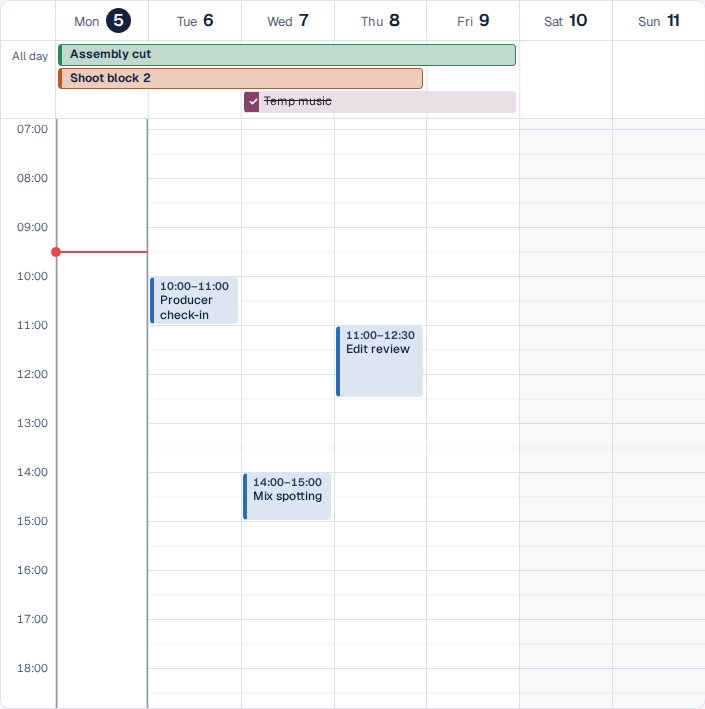
Week view: all-day work on top, timed sessions below. Send it to everyone’s calendar
Calendar links and connected Google or Outlook calendars carry each time as a moment too, so every calendar app shows it in its owner’s zone. Calendar links.
Move it without breaking it
Dragging a timed item to another day keeps its time of day, even across a clock change.

Other ways
Write the zone next to every time
Clear on the page; everyone still converts in their head, and clock changes catch people out.
A second time zone in your calendar app
Google Calendar and Outlook can show another zone beside your own. Handy for one person; the team still keeps several calendars.
Everyone works in the office’s time
Simple to read; easy to miss a call that’s at 7:00 for someone else.
Questions
What time zone do all-day items use?
None: an all-day item is a date, the same for everyone.
What about events from Outlook or Google Calendar?
They come in at their real times, whatever zone the calendar uses, and show in each person’s own.
Can I see two zones at once?
Kapcal shows times in one zone, your own; change it in User account → Time zone.