How to send everyone a calendar that stays up to date
Short answer
Give each person a private calendar link to the schedule: they subscribe to it once in Outlook, Google Calendar or Apple Calendar, and their calendar app picks up changes by itself. In Kapcal, everyone makes their own under Tools → Calendar syncing → Subscribe → Calendar link, for everything or only the categories they’re showing. It’s one way: dates are changed on the board, and calendar apps refresh it on their own schedule.
Why emailed updates don’t work
“Revised schedule attached” works for the first version. By the fifth, people have three copies in their inbox, the dates in their own calendar are the ones they typed in a month ago, and the one change that mattered was in the subject line of an email they skimmed.
A calendar link turns that around: people subscribe once, and from then on their calendar fetches the schedule itself.
Step by step
Choose what goes in
Show the categories the link should carry. In Tools → Calendar syncing → Subscribe → Calendar link, pick everything on the board or only the categories shown now, then Create my calendar link.
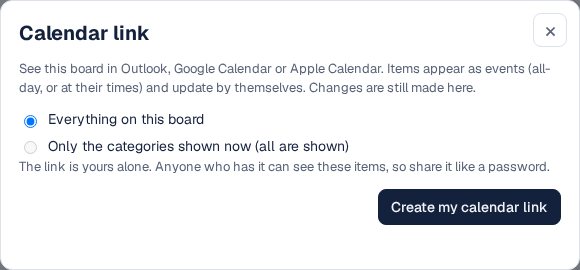
Your own calendar link, for Outlook, Google or Apple Calendar. Add it to a calendar app
Use the Apple Calendar, Google Calendar or Outlook button, or paste the link where your calendar app subscribes from a URL. Items appear as events: all-day, or at their times.
Everyone makes their own
Each person signs in and makes their own link, so it carries what they can see. Someone with a locked view gets only that view’s items. Viewers are free on every plan.
Change dates on the board
The link is one way. Move items in Kapcal and the calendar apps pick up the change: within minutes in Apple Calendar, every few hours in Google Calendar and Outlook. The link’s window says when a calendar app last read it.
Keep it private
Anyone who has the link can see what it carries. If it has spread too far, Make a new link: the old one stops working, and you subscribe to the new one.

Other ways
Email the schedule
Everyone has it today; by next week it’s one version among several.
Share a Google or Outlook calendar
Updates in seconds for people on the same service; it shares the whole calendar, and someone has to keep it in step with the real schedule.
A read-only web link
Always current, nothing to subscribe to, but it lives in a browser tab rather than in people’s own calendars. See sharing with clients.
Questions
How quickly do changes show?
It depends on the calendar app: within minutes in Apple Calendar on a Mac, every few hours in Google Calendar and Outlook. Why subscribed calendars fall behind.
Can people change dates from their own calendar?
No. The link is read-only; dates are changed on the board. For two-way editing, connect a Google or Outlook calendar on the Pro plan.
How far back does it go?
From a year ago onward, so calendar apps aren’t weighed down with old events.
Is it on the Free plan?
Yes: the Free plan includes one calendar link for the organization, and paid plans as many as you like.