How to give each team its own view of one master schedule
Short answer
Keep one schedule for everyone and save a view for each team: the categories, filters and tab that team needs, given to its people. They open the board in that view and switch to the full board when they want; a locked view shows them only their part. Everyone works from the same dates, so nothing has to be copied between team calendars.
Why separate team calendars drift
When design, engineering and marketing each keep their own calendar, the same launch date lives in three places. One gets moved and the others don’t, and nobody finds out until the day.
One shared calendar fixes that, but everyone then wades through everyone else’s work. What helps is one schedule underneath and a different window onto it for each team.
Step by step
Show what the team needs
Switch on the team’s categories, set the filters (an owner, a status) and pick the tab they use most: Calendar, Agenda or Workflow.
Save it as a view
Open Full board ▾, beside Filters, and choose Save what’s on screen as a view…. Name it after the team and tick the people who get it. Months shown sets how much of the calendar opens.
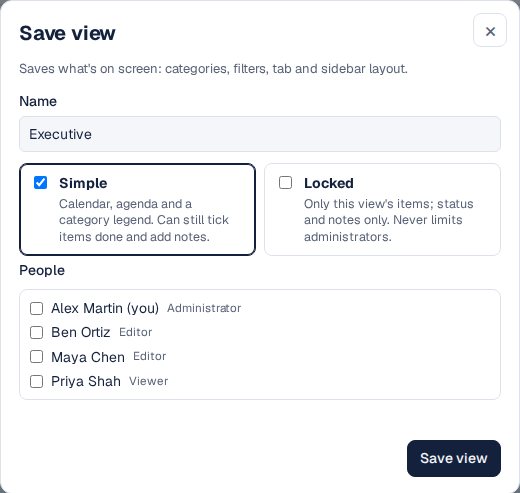
A saved view: its name, how it opens, and who gets it. Choose how much they see
Simple shows just the calendar, the agenda and a legend of the view’s categories. Locked shows people only the view’s items, and they can change only status and notes. Administrators are never locked.
Let them switch
People open the board in their view; the same menu switches between their views and the full board. Your own view never changes theirs.
A saved view opened, then shared as a read-only link. Keep views up to date
New categories start hidden in existing views. To add one, open the view, show the category, and choose Edit next to the view, then Update view with what’s on screen.

Other ways
A calendar per team
Each team sees only its own, and the dates they share drift apart.
Everyone filters for themselves
Works for people who know the board well; everyone else sees everything every time.
A board per team
Fully separate, so cross-team dates have to be kept in step by hand.
Questions
Can people outside the team see a view?
Yes: open the view and choose Tools → Share this view publicly to make a read-only link with its categories. See sharing with clients.
Does a locked view hide items from the calendar link?
Yes. A person’s calendar link carries only what their locked view shows.
Do viewers pay?
No. People who only look at the board are free on every plan.