How to share a project calendar with clients without showing them everything
Short answer
Put client-facing dates in their own categories, then share just those as a read-only link: clients see a live calendar and agenda with no account, without your notes or owners unless you choose, and the link can expire. For a client who wants the dates in their own calendar app, invite them as a free viewer with a locked view.
Why the usual ways give too much, or go stale
- Sharing your whole calendar shows internal sessions, notes and who’s doing what.
- Free/busy only hides so much that the client can’t find their own dates.
- A PDF or a screenshot is out of date the next time something moves, and then you send another one.
- A separate client calendar means typing every date twice and keeping both in step.
Step by step
Give client dates their own categories
Reviews, sign-offs, deliveries and the meetings a client attends each get a category, or a subcategory under the client’s project. Internal work stays in other categories.
Make a share link
Open Tools → Public share links → New link, tick the categories to share, and copy the link. Starting from a saved view? Open it and choose Tools → Share this view publicly.
A saved view opened, then shared as a read-only link. Choose what shows
Decide whether owners and notes are visible, whether visitors can show and hide categories, how many months the calendar opens on, and whether the link expires after 7, 30 or 90 days.
Send it once
The page always shows the live board, so there’s nothing to re-send when a date moves. If a link has spread too far, Make a new link replaces the address; Turn off sharing closes it.
For clients who want it in their calendar app
Invite them as a viewer (viewers are free on every plan) and give them a saved view set to Locked, holding only their categories. With their own sign-in they can add a calendar link to Outlook, Google or Apple Calendar, and it carries only what their view shows.
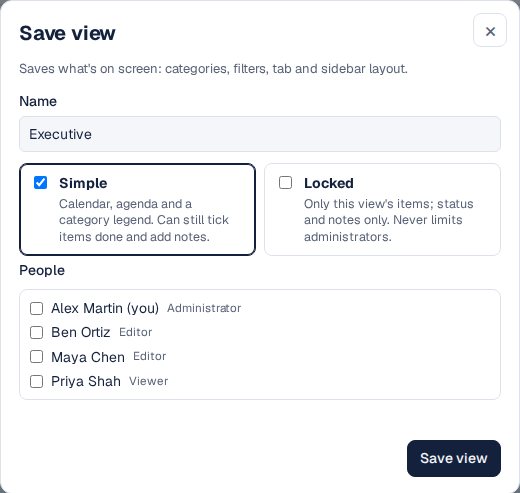
A locked view: the people who get it see only its items.

Link or sign-in?
Read-only link
No account, nothing to install. For clients, stakeholders, suppliers and anyone who only needs to look.
Viewer with a locked view
A sign-in, free on every plan. For people who want the dates in their own calendar app.
Editor
For people who change the schedule with you.
Other ways
Share your Google or Outlook calendar
Quick, but it shares all of that calendar, or only free and busy. A separate calendar per client controls it, and then you keep the copies in step.
Send PDFs
Clients like them; they’re out of date by the next change.
Questions
Do clients need an account?
Not for a share link. Viewers who sign in are free on every plan.
Can the client see my notes?
Only if you choose: each link decides whether owners and notes show.
Can I share different things with different clients?
Yes. Make one link per client, each with its own categories.
Can visitors change anything?
No. A share link is read-only, and items without dates aren’t shown.