Gantt chart or calendar: which one does a project schedule need?
Short answer
Both, from the same items. A calendar answers “what’s on this week, and who’s booked?”; a Gantt chart answers “what depends on what, and what happens to the launch if this slips?”. Project schedules need both questions answered every week, and keeping two separate plans means they drift. In Kapcal, the calendar, the agenda and the Gantt-style Workflow timeline are the same items, so a change in one shows in all of them.
What each one answers
| Calendar | Gantt chart | |
|---|---|---|
| Reads as | Days and weeks, at a glance | Bars on a timeline, in order |
| Answers | What’s on when, who’s booked, what clashes | What depends on what, what’s late, what sets the end date |
| Good for | Sessions, bookings, meetings, deadlines | Phases, dependencies, milestones |
| Who checks it | Everyone, every day | Whoever runs the schedule, every week |
| Weak at | Showing that one slip moves ten things | Showing next Tuesday at a glance |
Why keeping two plans fails
Many teams keep a calendar for everyone and a Gantt chart for the project manager, often in different tools. The first time a task runs late, the Gantt chart gets updated and the calendar doesn’t, or the reverse. Within a month the two disagree, and people check whichever they trust.
One plan, both ways
Put the work on the calendar
Add sessions, bookings and stretches of work as items in categories (Design, Build, Reviews), each with its dates. That’s the calendar and the agenda.
Open the Workflow timeline
The Workflow tab shows the same items as a Gantt-style timeline, by track (a team, a room) or by phase. Drag one item onto another to put it inside; the phase spans what it holds.
A task stretched on the timeline: everything after it moves along until a locked delivery date stops it. Draw what depends on what
Pick an item and drag the handle at its end onto the one that follows. When something finishes late, what follows moves to the next working day, only as far as needed, on the timeline and the calendar alike.
Mark the milestones
Make sign-off or launch a milestone, and lock the dates that can’t move. Days ▾ → Critical path then shows the chain that sets your end date.
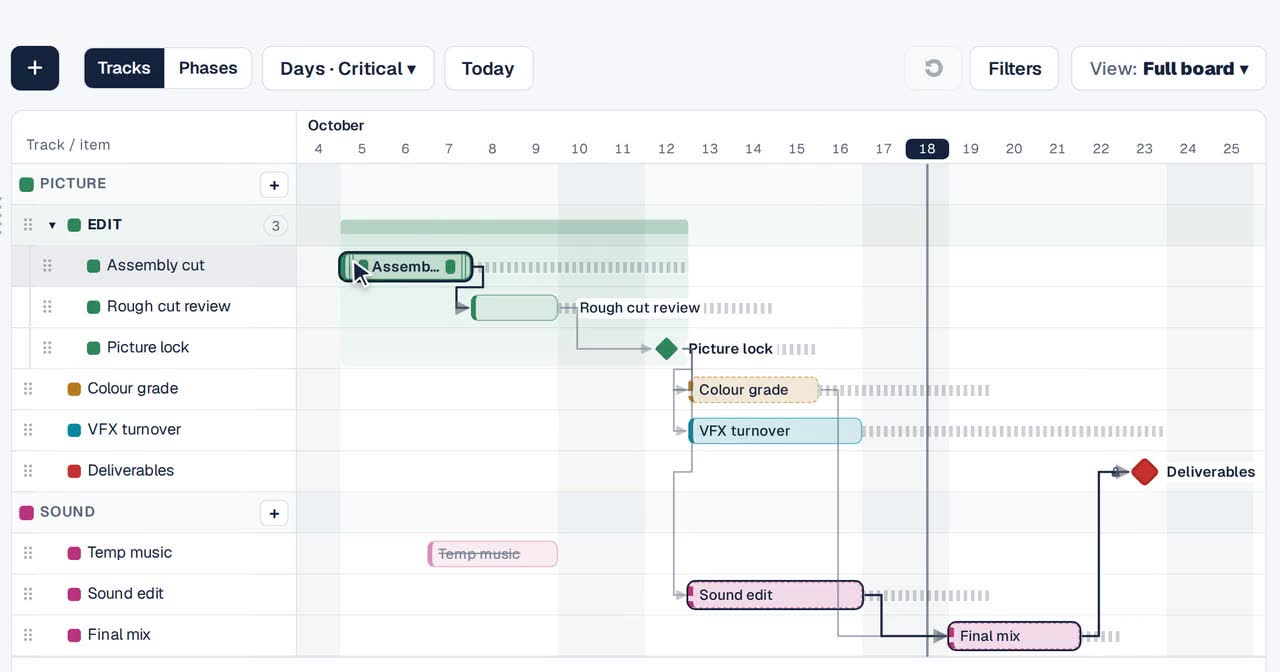
The critical path, outlined; stripes show spare working days.

Other ways
A spreadsheet Gantt
Coloured cells across a row of dates. Easy to start; every change is redrawn by hand.
A dedicated Gantt tool
Strong on dependencies; usually separate from the calendar the team actually checks.
A project tool’s timeline view
Shows tasks on a timeline; sessions, bookings and meetings tend to live in another calendar.
Questions
Is Kapcal’s Workflow a real Gantt chart?
It’s a Gantt-style timeline: phases, dependencies, milestones, locked deadlines and the critical path, built on the same items as the calendar.
Do I have to use both?
No. Teams that only need a calendar never have to open Workflow; the arrows and phases are there when the schedule needs them.
Can people outside the team see the timeline?
People on the board see every tab they have access to; read-only share links show the calendar and agenda.